Digital Forms for K-12 School Districts

Digital forms for K-12 school districts replace paper and PDF forms with online workflows that route automatically, validate data at submission, and capture audit-ready documentation. Districts use digital forms to handle enrollment, hiring packets, timesheets, field trip approvals, purchase requisitions, personnel actions, and the hundreds of other processes that move between school sites, central office, HR, and finance every day.
Informed K12 is a digital forms and workflow platform built specifically for K-12 district complexity. It connects forms to the people, approvals, and systems they need to reach without replacing the ERP, HRIS, or SIS your district already runs.
Why generic form builders don't work in K-12
Most form-building tools handle the simple case: capture a signature, collect a response, send a notification. K-12 forms rarely stop there.
A single field trip request needs to route to the site administrator, the principal, the program manager, and finance, with conditional logic for funding source and overnight stays. A personnel requisition needs to validate budget codes against position control before HR ever sees it. A timesheet correction needs to flag duplicate entries against payroll history before it triggers a corrected pay run.
Generic form tools were built for transactions. K-12 districts need forms that handle:
Multi-step approval routing across departments and school sites
Conditional logic that enforces district policy at the point of submission
Validation against budget codes, position control, and existing system data
Audit-ready documentation captured automatically on every submission
Integration with the ERP, HRIS, and SIS that already hold the final record
Permission-based access so principals, finance, HR, and central office each see what they should
Districts running operations on Jotform, DocuSign, Google Forms, or fillable PDFs hit this wall fast. The form gets submitted; the work still happens in email, spreadsheets, and follow-up phone calls.
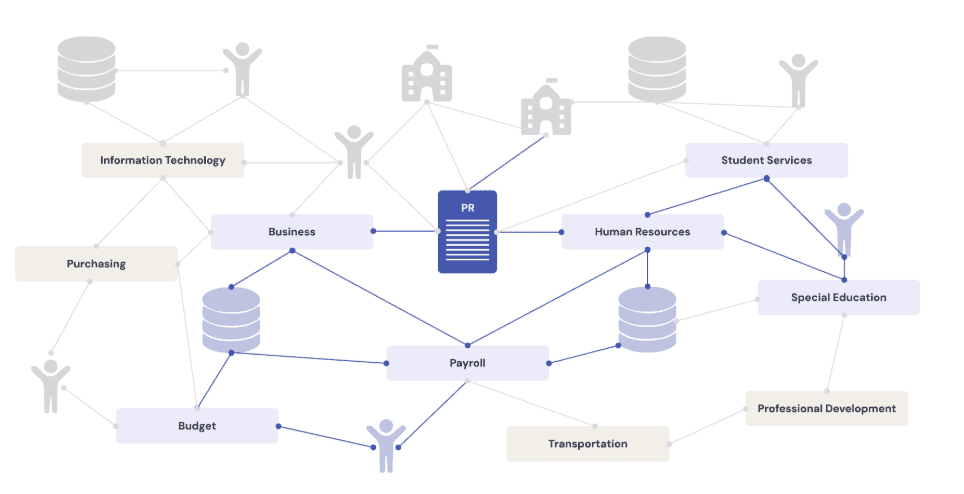
Schools run on forms. And they're everywhere.
Every department in your district runs on forms that move between people, sites, and systems. Here's what districts using Informed K12 typically digitize across departments:
Business Services
Travel and conference requests, extra duty and supplemental pay, mileage reimbursement, general reimbursements, purchase card forms, purchase orders and requisitions, and timesheet processing.
Human Resources
Timesheets, transfer requests, onboarding packets, offboarding, personnel actions, resignation, retirement, and professional development requests.
Special Education
30-day interim placement, amendment forms, 504 plan consent, assessment plans, transportation, teletherapy consent, SEIS IEPs for e-signature, and IEP consent and signature.
Education Services
Inter-district transfer, intra-district transfer, summer school applications, remote learning agreements, special program applications, transcript requests, course placement and drop, and senior graduation status.
How digital forms work in Informed K12
Move existing paper forms online without rebuilding from scratch
Your existing forms get mapped to digital workflows, including the real-world approval paths your district uses today. No custom coding, and no disruption to current payroll or hiring runs.
Route approvals automatically based on your district's rules
Approval routing handles complex paths that don't follow rigid org charts. Conditional logic enforces policy at submission. Reminders and escalations move work along without manual follow-up.
Validate data at the point of submission
Budget codes, pay rates, funding sources, and position control checks run upstream so errors get caught before they reach payroll or finance. Districts using this approach detect duplicate entries, miscoded budget lines, and unapproved spend before dollars leave the district.
Connect forms to the systems you already run
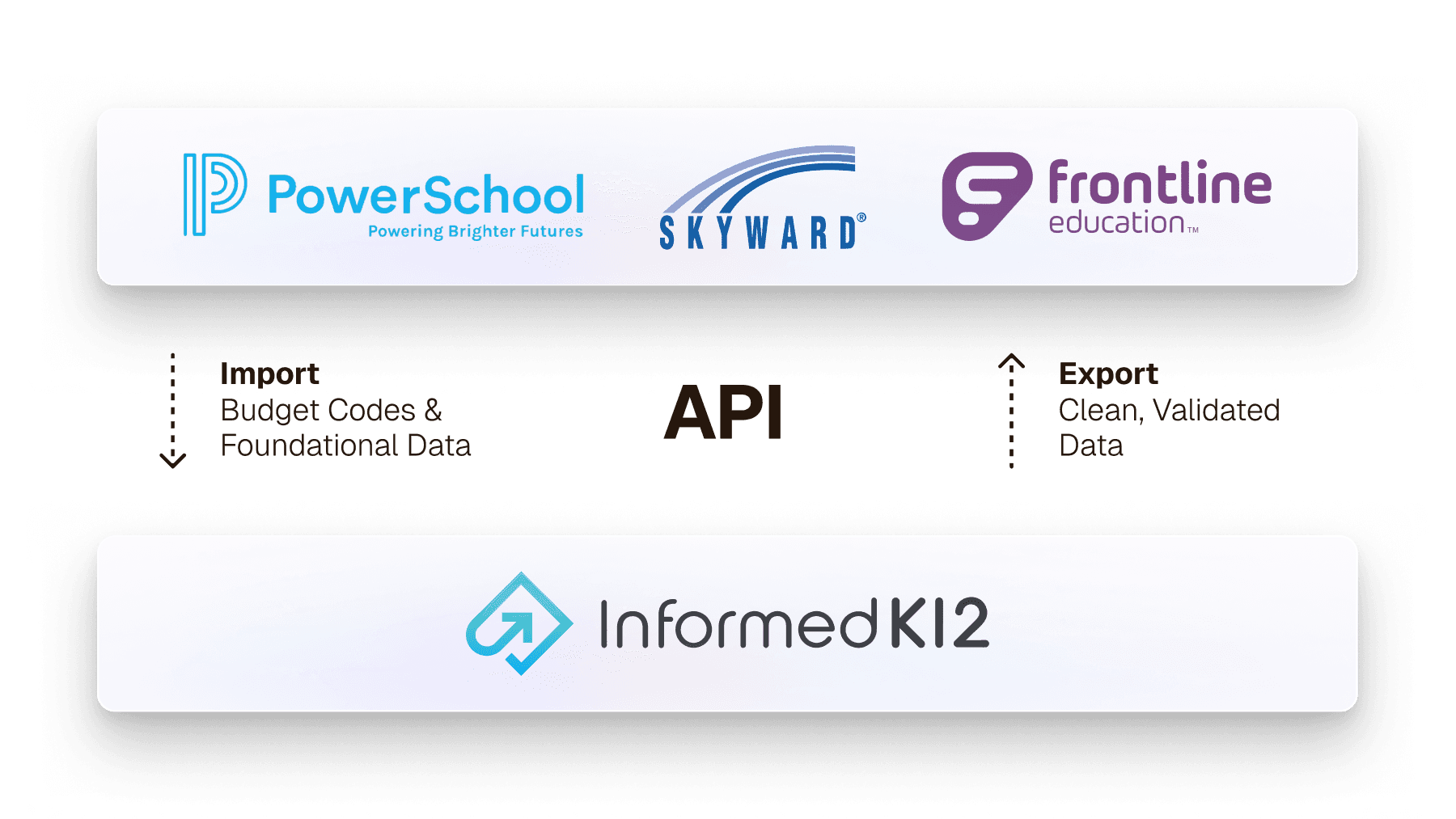
Open APIs pull data from Skyward, PowerSchool, Frontline, Tyler Munis, and others, then push validated data back. The ERP, HRIS, and SIS remain the systems of record.
Generate audit-ready documentation automatically
Every form submission produces a complete timestamped record of interactions, approvals, signatures, and corrections. Audit reports run in minutes instead of days.
Update forms without IT bottlenecks
Staff launch and update forms when policies, people, or budget codes change, without writing a single line of code or filing an IT ticket.
What to look for in a K-12 forms platform
Districts evaluating digital forms tools should test against these requirements before signing anything:
Requirement | Why it matters in K-12 |
|---|---|
Multi-step, conditional approval routing | Field trips, personnel actions, and supplemental pay rarely follow a straight line. Tools that route only one approver miss 90% of district work. |
Integration with K-12 ERP, HRIS, and SIS | Forms that don't connect to Skyward, PowerSchool, Frontline, or Tyler Munis create new silos instead of closing existing ones. |
Built-in validation against district data | Budget code checks, position control validation, and pay rate verification need to run at submission, not after. |
FERPA compliance and permission-based access | Student and personnel data require access controls generic SaaS tools rarely build. |
Audit trail capture on every workflow | Every district faces audits. Manual documentation pulls take days of staff time that automation can eliminate. |
K-12 implementation expertise | Vendors who don't know how K-12 budget cycles, position control, or collective bargaining work will misconfigure your workflows. |
Self-service form updates | Policy and people change every year. Forms that need IT support to update become a permanent IT backlog. |
Results from districts using digital forms in Informed K12
Simi Valley Unified: 40+ processes digitized district-wide
Simi Valley Unified School District, one of the largest in Ventura County, faced significant operational challenges managing internal processes across a large team of educators and administrators. The Request for Personnel process, essential for hiring and staffing, was prone to delays and bottlenecks because of paper forms and the multiple approvals and signatures each required. After partnering with Informed K12, Simi Valley digitized the Request for Personnel process, then expanded across the district. The platform now runs Request for Personnel forms, Onboarding Packets, Field Trip Requests, Short Form Service Agreements, Mileage Reimbursements, Bank Reconciliations, and the district's annual Intent to Return process, among others. Within the Intent to Return rollout, 60% of forms were returned within 48 hours and 83% within the first week. Associate Superintendent Ron Todo led the initiative, recognizing that operational inefficiencies were limiting the district's mission to serve students and staff. The platform now supports nearly 40 forms across departments and school sites.
Across districts using digital forms in Informed K12
85% reduction in time spent on any process from start to finish, taking approvals from weeks to two days on average
45% increase in form completion within 24 hours for teachers, students, and parents
100% reduction in duplicate spend errors on budget-related approvals
30% higher completion rates for grant-related funding forms (Impact Aid, Title programs)
"Informed K12 is exceeding our expectations each step of the way." — Jason, Director of Business Services, Fremont Union School District
FAQ
Common questions from district leaders
Everything you need to know about modernizing your operations without the risk. Still have questions? Schedule a conversation.
What's the difference between a digital form and a fillable PDF?
A fillable PDF captures data in fields but does nothing with it after submission. The form still has to be emailed, printed, signed, scanned, and re-entered into other systems. A digital form on a workflow platform routes automatically to the right approvers, validates data at submission, integrates with other systems, and produces an audit trail of every action taken on the form.
How are digital forms different in K-12 compared to other industries?
K-12 digital forms have to handle multi-step approval routing across school sites and central office, validate against budget codes and position control, comply with FERPA for student data and personnel privacy rules for staff, and integrate with K-12 specific systems like Skyward, PowerSchool, Frontline, and Tyler Munis. Generic form tools built for general business use rarely handle these requirements out of the box.
What digital forms can K-12 districts use?
K-12 districts typically digitize forms across business services (travel requests, reimbursements, purchase orders, budget transfers), human resources (onboarding, personnel actions, timesheets, leave requests), special education (IEP consents, assessment plans, placement forms), education services (transfers, summer school applications, transcripts), student services (residency affidavits, field trip approvals, work permits), early childhood (enrollment, parent declarations), administration (board reports, donations, fundraising), and legal (contracts, agreements).
How long does it take to digitize a K-12 form?
Most districts launch their highest-priority workflows within weeks of starting implementation. Existing paper forms and approval paths get mapped, digitized, and tested without custom coding. Districts typically start with one or two high-volume workflows and expand from there.
Do staff need IT support to update digital forms?
No. Staff update forms, change approval routing, and add conditional logic through self-service administration. IT involvement is required only for initial integrations and security configuration.
Can parents and students submit digital forms?
Yes. Districts use Informed K12 for parent and family-facing forms including enrollment, residency affidavits, field trip permissions, and special program applications. Districts using this approach see 45% higher form completion within 24 hours.
What does it cost to switch from paper to digital forms?
Pricing depends on district size and scope. Districts can start with a focused set of high-priority workflows or move to a district-wide platform. The investment typically pays back through reclaimed staff time, prevented payroll errors, and reduced audit preparation costs. Kent School District documented a 750% ROI on their supplemental pay workflow alone.
Explore Resources
Event
Webinar: Technology Consolidation and What It Unlocks
Lessons from Natomas Unified
Event
On-Demand Webinar: HR Best Practices for Managing the Full Employee Lifecycle
HR leaders from three districts explain what changed once HR processes stopped living across separate systems
Blog
Risks of Inaccurate HR Data
Every HR form is a service an employee depends on. When the process runs by hand across systems, accuracy breaks and the service fails.